

RPG game
The RPG game page sets up everything your players face and win in the RPG: creatures, dungeons, the Tower, the weekly raid, quests, titles, travel events and guilds.
The page has ten tabs: Recipes, Bosses & Monsters, Dungeons, The Tower, Fishing, Raid, Quests, Titles, Adventures and Guilds.
Recipes tab
Section titled “Recipes tab”Crafting recipes describe what a player can craft at the workshop, from materials looted off monsters or bought.
The New recipe button asks for the crafted item, its materials (each must name an existing item), the coin cost and the required level.
Shipped recipes are shared by every server and cannot be edited here. Without recipes of your own, the server only uses those.
Bosses & Monsters tab
Section titled “Bosses & Monsters tab”The server bestiary lists the creatures your members fight. A filter separates All, Bosses and Monsters.
Bestiary difficulty
Section titled “Bestiary difficulty”Three tiers rewrite the stats, rewards, loot chances and respawn delay of every creature in the category at once:
| Tier | Effect |
|---|---|
| Easy | Short fights, for a server that is starting out or plays now and then. |
| Medium | The balance shipped with the bot, neither forgiving nor punishing. |
| Hard | Creatures that take a beating and hit back, but pay more. |
Bosses and monsters are set separately. Nothing is locked: a creature can still be edited afterwards, and the next tier starts from your own tweaks. Applying a tier asks for confirmation, since it also rewrites creatures you already customised, keeping their gaps proportionally. The confirmation states how many creatures are concerned and previews the health before and after.
Kotbo recommends a tier from actual results: your players win N% of their M fights over the last X days, the … tier would suit them better, or the current tier holds up. Without enough fights over the period, it recommends nothing.
Two safeguards:
- Low-level creatures only take part of the tier, so the early game stays open.
- Clan points, and loot that grants XP or clan points, are never touched.
Customising a creature
Section titled “Customising a creature”Creatures shipped with the bot are shared by every server. The Customise button creates a copy owned by this server without touching the original; Reset brings it back at any time. A built-in creature cannot be renamed: the name is what links it back to the original.
A creature sheet carries its name, emoji, description, level, health, XP reward, coin reward, clan points on victory and, for a boss, its respawn delay.
Badges say where a creature comes from: Built-in, Server-made, Customised, Hand-tuned (stats set by hand, no longer following the tier), Boss or Disabled. Every row also shows its win rate over the last few days.
One loot at most is rolled per victory, in list order. Each entry names an item (which must exist in the shop or in the global catalogue), its chance in percent and optional bonus coins. With no loot, victory only grants XP and coins.
Clan points on victories
Section titled “Clan points on victories”A switch at the top of the tab grants the winner’s clan the reward set on each creature. Turning it off suspends the RPG’s contribution to the clan standings without zeroing every reward. A player without a clan earns nothing.
Import and export
Section titled “Import and export”Export downloads this server’s bestiary as JSON. Import replaces creatures with the same name and adds the rest; nothing is deleted, and loot whose item does not exist on this server is stripped on import.
Dungeons tab
Section titled “Dungeons tab”A dungeon is a series of bestiary bosses to fight back to back: HP does not come back between floors, loot is held until the exit, and a defeat loses all of it.
New dungeon asks for a Name, an Emoji, a Description, a Required level, an Energy cost and a Wait (hours) between two entries by the same player (0 for no wait).
- Floors: the bosses, in the order players face them. The same boss can come back. A summary gives the total HP, the strongest boss and the rewards of a full run. Editing floors does not change runs already started.
- Final chest: granted to every player who clears the last floor - coins, RPG XP, and optionally an item, a title or a role.
- First to clear: a bounty paid only once, to the first player on the server who finishes the dungeon, announced in the bestiary’s first-kill channel. Put back in play makes it available again.
- Dungeon open: when closed, it disappears from the dungeon hall; runs already started can still be finished.
You need at least one boss in the bestiary to create a dungeon. If a floor points to a boss that no longer exists, the dungeon stays closed to players until it is replaced. Each card shows its runs, clears and defeats.
The Tower tab
Section titled “The Tower tab”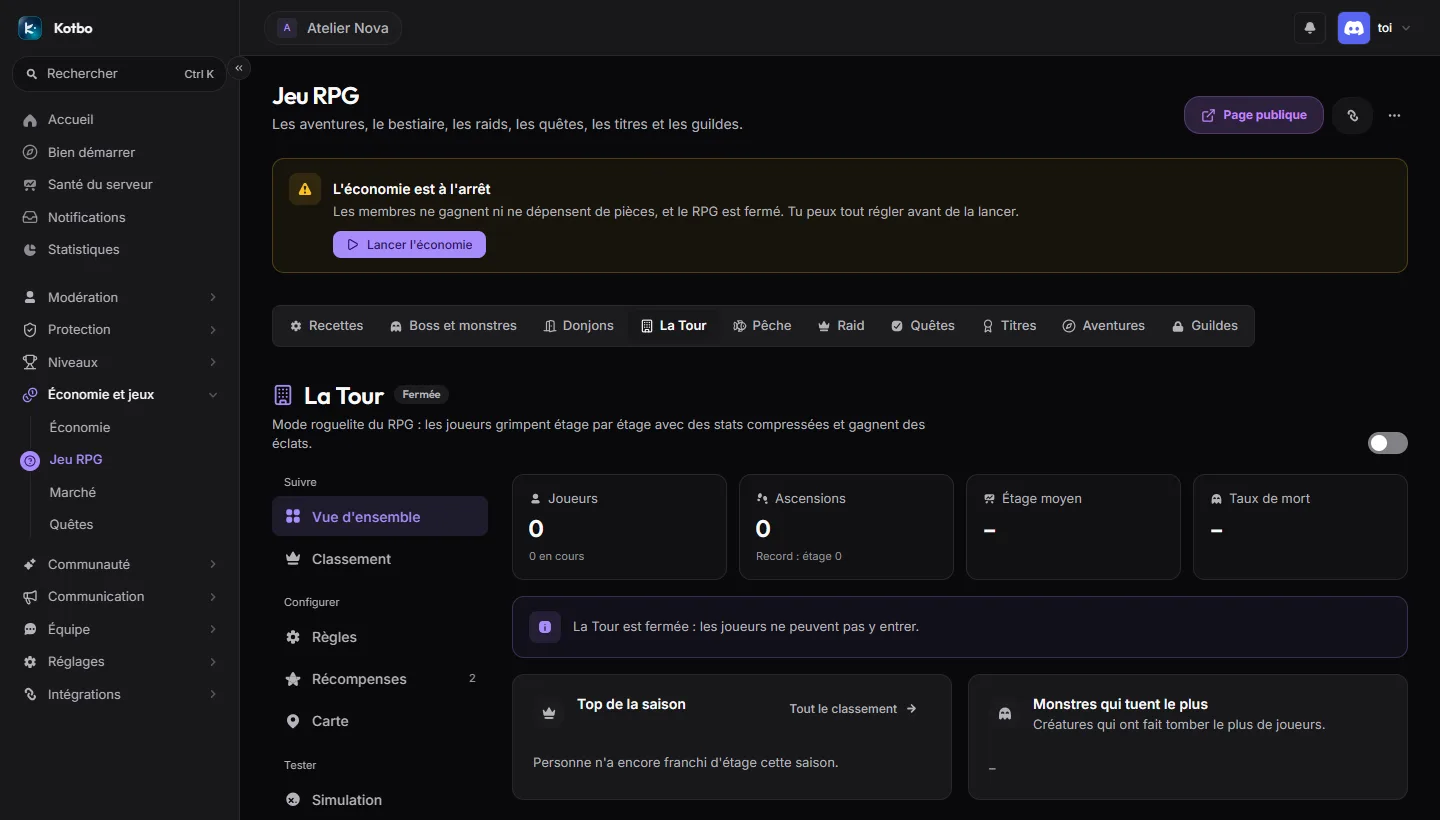
The Tower is the RPG’s roguelite mode: players climb floor by floor with compressed stats and earn shards. On Discord, it opens with /tower.
The tab first shows the Season top, the Deadliest monsters and the Daily challenge, then the settings:
- Identity, Tower entry (how RPG stats are converted at the start - the class and its skills are always kept, and a preview shows the gap between an overpowered player and a beginner), Difficulty and pacing, Climb and community.
- Shards: Permanent upgrades, Items traded for shards (title, role, item, coins, XP, clan points) and Milestones triggered by the number of floors cleared in a single climb. A death or leaving ends the climb and pays out the shards.
- Tower map: an editor draws each floor room by room - creatures, elites, guardian, chests, trials, merchant, exit and sealed staircase. A floor can have several variants drawn at random, be mirrored, and be exported and imported as JSON. Discord preview shows the floor as the player will see it.
- Balance simulator: replays climbs to show where players die, floor by floor.
- Reset the Tower starts the season over.
Clan Tower adds a weekly tower that each clan climbs on its own. Once on, a Solo Tower / Clan Tower switch at the top of the tab moves between the two setups. It only opens if clans are enabled.
Fishing tab
Section titled “Fishing tab”Fish species lists what bites when a player fishes, by rarity. Each rarity’s odds are fixed and shared among its enabled species: a rarity with no species never comes up.
- Built-in species can be Customized (or brought back with Restore original) and disabled; their name does not change, since players’ catches are tied to it.
- New species creates a Server-only one, with its Name, Emoji, Rarity and Coins. Renaming it also renames past catches.
Fishing log rewards reward players who fill their log, tier by tier up to the Complete log: coins, clan points or guild XP, item, role or title. Leaving everything at zero silences a tier.
Raid tab
Section titled “Raid tab”Once a week a boss opens for a few hours. Each team faces its own instance, with a health pool that follows its size: every team runs the same trial, and the largest one cannot monopolise the health bar.
What counts as a team
Section titled “What counts as a team”- Server clans (recommended): membership is read from the Discord role. Rewards go through clan points, with the season, the standings and debt repayment.
- RPG guilds: membership is read from the game profile. Team points go to guild XP instead of clan points.
The raid needs one of the two: without a team module, it cannot be enabled.
Opening
Section titled “Opening”- Automatic opening: the raid opens on the configured day and hour, in the server timezone. Turn it off to launch it by hand only.
- Duration (hours): the window during which members can strike.
- Announcement: the message carries the assault button and each team’s progress bar. Without an announcement, nobody can strike.
- Raid boss: a specific boss, or Random among enabled bosses.
The Launch a raid now button opens the window right away. Save your settings first: the launch uses what is saved, not what is on screen.
Balance and rewards
Section titled “Balance and rewards”- HP per member, with a minimum HP and a maximum HP. A preview announces what a team of 3 and a team of 20 face.
- Assaults per member, Energy per assault and Purchasable assaults per member (through potions; at zero, nothing can be bought).
- Team XP, Team coins, Team clan points or Team guild XP, all set per member.
- Consolation for a failing team (%): the share of the pool paid to a team that struck without bringing its boss down. At zero, only victory pays.
A team’s pool follows its size and is shared between participants: 30% split evenly, the rest in proportion to damage.
Raid bosses and spells
Section titled “Raid bosses and spells”Raid boss sheets belong to the server. Each picks its spells from the shipped catalogue: one spell per turn when it is off cooldown, with phase spells (Below N%) taking priority. With no spell, the boss only hits.
Restore shipped bosses puts back the ones that are missing, without touching yours.
Following a raid
Section titled “Following a raid”A Raid running block shows the teams engaged and their progress. At the close, the last raid results stay on screen until the next one opens: teams, top strikers, damage and assaults. The tab also keeps the history of past raids.
Quests tab
Section titled “Quests tab”Game goals to reach within a time window.
A quest defines its goal, its target and its window (hours). The available goals cover monsters killed, bosses downed, raid assaults and raid damage, items looted, items crafted, successful upgrades, adventures resolved, fishing, daily rewards, shop or black market purchases and coins spent.
The window is clock-aligned: 24 h resets at midnight UTC, 6 h at 00, 06, 12 and 18. Every team therefore runs the same clock.
Two scopes:
- Personal: each member has their own progress. The reward is paid automatically on the action that reaches the target, with nothing for the player to do.
- Team: the whole team pushes the same counter. The reward is split in proportion - 30% evenly, the rest by what each member brought - and paid automatically on completion.
The Repeatable within the day switch decides what happens once the quest has paid out:
- On: the quest resets as soon as it pays, and the player can run it as many times as they like inside the window. Its card carries the Repeatable tag.
- Off: the quest pays once every 24 h. Finished sooner, it waits out the delay before paying.
A disabled quest is no longer offered and stops counting. Clan points are only paid while the RPG to clans bridge is open, in the Bosses & Monsters tab.
Titles tab
Section titled “Titles tab”A title shows at the top of the character card and can grant stats; only the title worn counts. New title creates one, cosmetic or with bonuses.
Players earn a title by beating a creature that offers it, clearing a dungeon, through the Tower, fishing or an adventure - or from you: Choose a player then Grant. Each title shows how many players own it, and Remove the title takes it back.
Adventures tab
Section titled “Adventures tab”Travel events lists what happens to players at the end of a journey. With no events, journeys end without an encounter.
- Built-in events are shared by every server: Customize creates your version, Restore original drops it, and the Offer this event to travellers switch takes them out of the draw.
- New event asks for a Title, an Emoji, What happens and several Choices offered. Each choice has a Button label, its gains or losses (a negative value takes HP or coins away), a Min. level and an optional Title given. A choice above the player’s level stays visible but greyed out.
Guilds tab
Section titled “Guilds tab”RPG guilds lists the guilds created by players, with their level, members, treasury and village buildings. You can fix a guild here without resetting everything:
- Edit: Name, Banner, Description, Treasury and Leader.
- Remove from guild a member.
- Dissolve the guild.