

Server health
The Server health page gives your server a score out of 100 every day, explains what pushes it up or down, compares it with servers of the same size, projects its growth and flags unusual days.
The score is computed every night for the previous day. The Recompute button computes it right away and rebuilds the available history.
The page has three tabs: Overview, Health and Predictions.
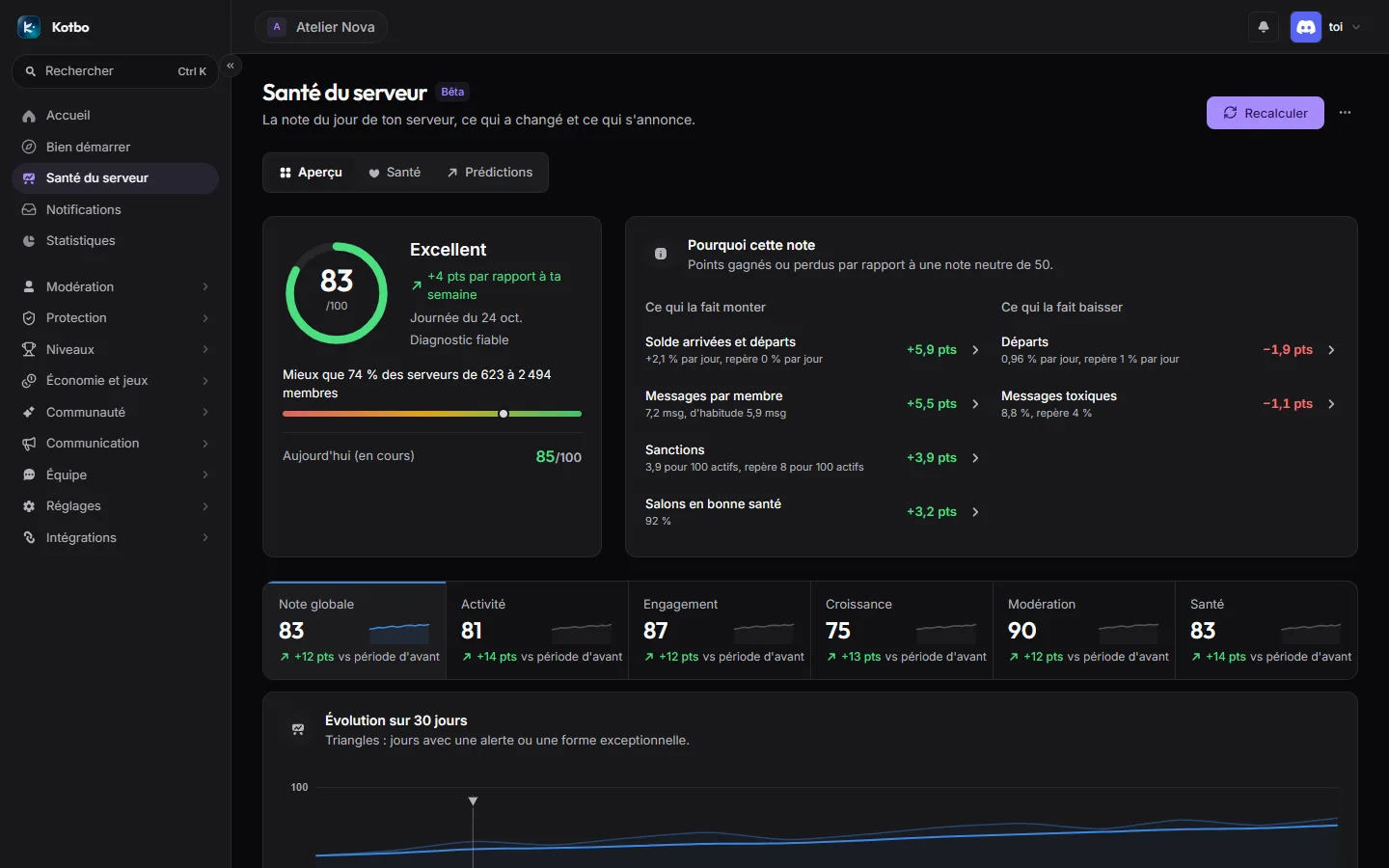
Overview tab
Section titled “Overview tab”Today’s score
Section titled “Today’s score”The score out of 100 is rated Excellent, Good, Average, Weak or Critical, with its trend over the last 7 days. It comes with:
- a reliability, which depends on active members, history length and available signals;
- an anonymous comparison with Kotbo servers of the same size, on the same day and with the same scale. Enough comparable servers are needed for it to show.
The score accounts for the day of the week (a Sunday is compared with your usual Sundays) and for the server’s size: a small server is not judged on a large one’s figures.
Why this score
Section titled “Why this score”This block lists the factors as points gained or lost compared with a neutral score of 50: Pushing it up and Pulling it down. Each factor leads to the page where you can act.
30-day trend
Section titled “30-day trend”The chart puts the day back in its trend, with the 7-day average and the five sub-scores. Triangles mark days with an alert or an outstanding run. Clicking a day shows its details: messages, voice, active members, joins / leaves, sanctions and tickets resolved.
Alerts and tips
Section titled “Alerts and tips”The page comments on the score instead of leaving it raw: dormant activity, high sanctions, many departures, pending tickets, unhealthy channels, or on the contrary an excellent momentum. When history is too short, it says so.
Being warned of a drop
Section titled “Being warned of a drop”Warn me if the score drops creates an alert: every morning, Kotbo compares yesterday’s score with your week and warns you, in a channel or by DM, if it drops by at least the chosen percentage. Manage alerts opens the Statistics alerts, where it is edited like the others.
Health tab
Section titled “Health tab”The tab details the five sub-scores, each with what it measures, its weight in the score (N % of the score) and its factors:
| Sub-score | What it measures |
|---|---|
| Activity | Messages and voice, compared with your usual days. |
| Engagement | Who takes part, who comes back (daily versus monthly active members), and whether messages get answered. |
| Growth | Joins and leaves, smoothed over the week. |
| Moderation | Sanctions and the tone of conversations, including the toxicity measured by AegisAI when it is on. |
| Health | Channel health and ticket follow-up. |
A sub-score with nothing to measure stays neutral.
The bump reminder
Section titled “The bump reminder”The Bump reminder module has neither a page nor a setting: you read it here. Kotbo recognises the public replies of the known bump bots - Disboard, Discadia, DiscordServers.com and Disforge - and works out on its own when the server may bump again.
The banner on the Overview tab then reads Next bump on … in N min, or Ready to bump on … as soon as the window opens. At the same moment, Kotbo posts a Bump reminder embed in the channel where the last bump happened, recalling who did it, without pinging anyone.
Predictions tab
Section titled “Predictions tab”Growth forecast
Section titled “Growth forecast”Projection of the member count in 7 days and in 30 days, with members gained per day and a Reliability. Low reliability signals a short or irregular history. Projected series show the observed data and, dotted, the 7-day projection with its likely range.
At least five complete days of history are needed to project a trend.
Typical week and typical day
Section titled “Typical week and typical day”The Typical week shows the most and least active days; the Typical day, messages per hour in server time, with the peak and low hours. Below 14 observed days, the profile is flagged as unreliable.
Detected anomalies
Section titled “Detected anomalies”Days clearly outside the norm - trend and weekday taken into account - are listed with their date, observed value and expected value. It is the right place to find the day something happened without anyone noticing.