

Getting started
The Getting set up page answers two questions: what to do right now, and what is still missing. It reads the server’s real configuration rather than a counter of completed steps: a setting you clear becomes “to do” again.
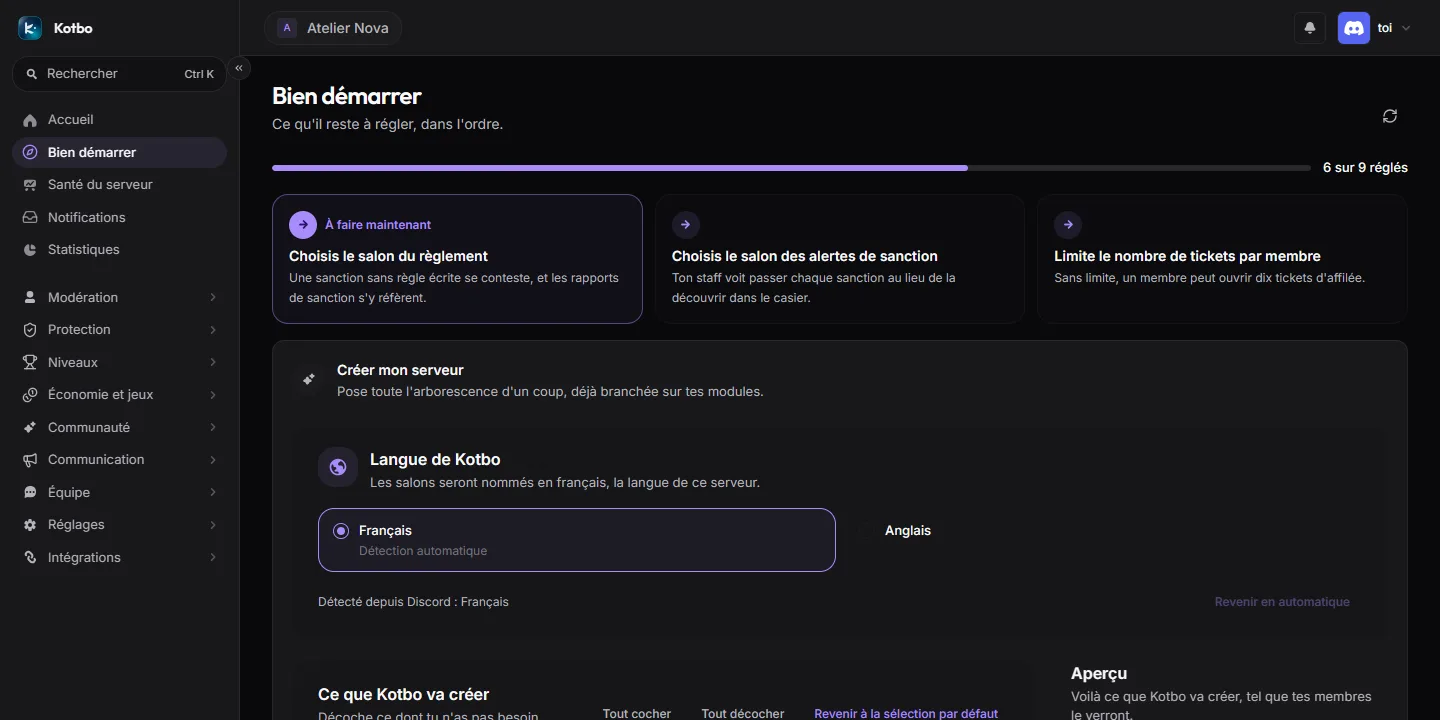
The next three actions
Section titled “The next three actions”At the top of the page, three cards name the points that are missing the most, in the recommended order. Each says what the setting brings, exactly what is missing, and guides you to the field to fill in on the page concerned. The first one is marked Do this now.
Progress
Section titled “Progress”A Progress line, at the top of the page, shows the percentage of points settled and the N of M set count, or All set when none is left.
Building the server
Section titled “Building the server”The Build my server block lays out the whole structure in a single operation: categories, channels, roles and permissions, already wired to the Kotbo modules.
Checking the permissions
Section titled “Checking the permissions”Kotbo states at the top of the block whether it holds the permissions it needs. If some are missing, it lists them and reminds you that the simplest fix is to give it the Administrator role for the setup.
Channels will be named in the server’s language.
Choosing what gets created
Section titled “Choosing what gets created”The What Kotbo will create panel lists everything that will be laid out, section by section:
- Server access and the Member role
- Verification (captcha)
- Security (including the honeypot channel)
- Welcome
- Staff
- Tickets
- Statistics (counters kept live in the channel names)
- Text channels
- Fun
- Bots
- Voice channels
- Roles
Uncheck anything you do not need: the Preview on the right follows live and shows the server as your members will see it. The Check all, Uncheck all and Back to the default selection buttons speed up the selection.
Some items are locked: they come with their section and uncheck along with it.
Every channel states its audience:
| Label | Meaning |
|---|---|
| Open to everyone | Visible even without any role. |
| Private: Member role only | Reachable once the Member role is granted. |
| Private: Staff role only | Reserved for the team. |
| Private: visible to the Unverified role only | Disappears once the captcha is passed. |
| Read-only | Only Kotbo posts there; members can react with emojis. |
Several channels arrive already wired: the highlights channel to Highlighted messages, the announcement channel to auto-thread, the temporary voice channel generator, or the trap channel pinned at the very top of the server, outside any category.
How the Member role is earned
Section titled “How the Member role is earned”Every channel is closed to @everyone and reopened to the Member role. Two ways to get it:
- On arrival: every newcomer gets the role as soon as they join, through the Welcome module’s auto-role. Nothing to pass, nothing to create.
- After a captcha: newcomers first get an Unverified role and only see the verification channel. The Member role is granted once they type the code back.
The captcha starts in image mode, and logs to the staff log channel. The voice channel is ready to use: you can switch to voice mode from the Anti-raid page.
Modules turned on
Section titled “Modules turned on”The Modules turned on block ticks the modules to put into service for the whole server:
- Tickets, Levels and XP, Economy and RPG
- AutoMod, on the recommended preset: Kotbo will start moderating messages
- Nickname moderation
- Channel health, analysis only: no channel is created or archived without your say-so
Some modules are turned on automatically because you are creating the matching channel.
Running the setup
Section titled “Running the setup”The Build the server button asks for confirmation, recalling the number of items to create and the list of modules being turned on.
Afterwards, Kotbo reports how many items were created and how many were reused (already present). The ticket panel is posted automatically.
If the operation is interrupted, run it again: nothing will be created twice.
The rules are not published straight away: write your articles on the Server rules page, then publish them to the channel that was created.
The points left to settle
Section titled “The points left to settle”Below the setup block, the points are grouped in three, each with its own counter:
| Group | What it covers |
|---|---|
| Essential | Without these three, the rest works badly or silently: log channel, moderator role, time zone. |
| Moderation | What it takes to run the server and make decisions defensible: rules published, protection enabled, sanction alert channel. |
| Server life | What brings members back: working tickets, ticket quotas, welcoming newcomers. |
Every line says why the point matters, and shows Missing: … while it is unsettled. A click opens the page where it is set.
Quick setups
Section titled “Quick setups”Under the list, the Quick setups block gathers complete setups in a single choice, to fine-tune module by module afterwards. Only those you can open appear:
| Card | What it sets |
|---|---|
| Security | A protection level sets filters and anti-raid at once. |
| Economy | A pace sets rewards, the daily cooldown and energy. |
| Levels | A ready-made XP curve, to adjust afterwards. |
| Prestige | A rank ladder and its rewards, in one choice. |
| Channel health | Alert thresholds matching the server’s size. |
These quick setups no longer have menu entries of their own.
Ce que vous n’avez pas encore configuré
Section titled “Ce que vous n’avez pas encore configuré”If you left tracks aside during the setup journey, they are listed here, with what they would bring and a link to the page that does the same work more thoroughly.
The journey itself does not reopen: replaying the structure setup on a server already built would duplicate channels.